Accreditation Eligibility and scope inquiries are accepted year-round. Begin with a no-fee eligibility and scope review. Start Free Eligibility Review · Current program status
Eligibility reviews open year-round · No fee Verify AccreditationContactMy CHSPS
CHSPS — Commission for Health, Safety & Professional Standards
Step by step, with real screenshots

My CHSPS Portal Guide

Everything about using your CHSPS dashboard — creating an account, applying for any of the 16 accreditation programs, paying fees, building evidence, annual maintenance and renewal. Signed in? The same guide lives in your portal under Help & guide, next to an assistant that answers questions from it.

Getting started

Create your account, sign in, and learn what lives where.

What is My CHSPS?

My CHSPS is the free account portal where your whole relationship with CHSPS runs: eligibility inquiries, applications, evidence uploads, invoices and receipts, annual maintenance and renewal filings, your certificates and promotion tools, and every notification. One account serves your entire organization's work across all accreditation types — certification programs, education providers, courses, assessment-based certificates, work-based learning, specialty accreditations and technology certifications. Your team signs in with email and password; everything you type is saved as you go.
Create your account and sign in

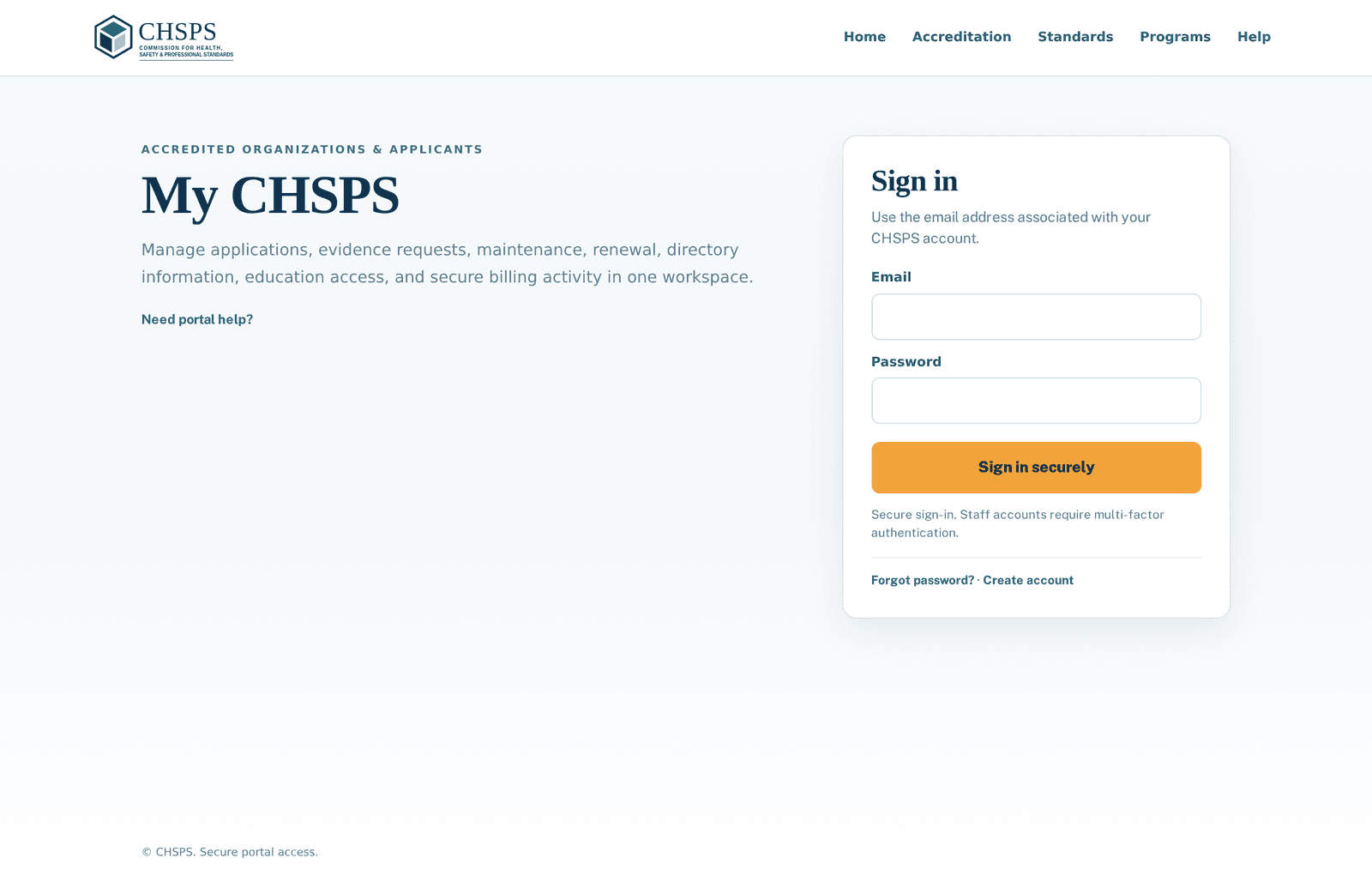
The My CHSPS sign-in page with email and password fields
Sign in at chsps.org/portal — or create your organization's account in about a minute.

Go to chsps.org/portal and choose to create an account with your work email, or sign in if your organization already has one. Passwords need at least 8 characters. If a colleague already manages your organization in My CHSPS, ask them to invite you instead so you join the same organization workspace — every application and record is shared at the organization level, not locked to one person. You can also get an account automatically by placing any order (including free $0 resources) as a guest and claiming it right after checkout.

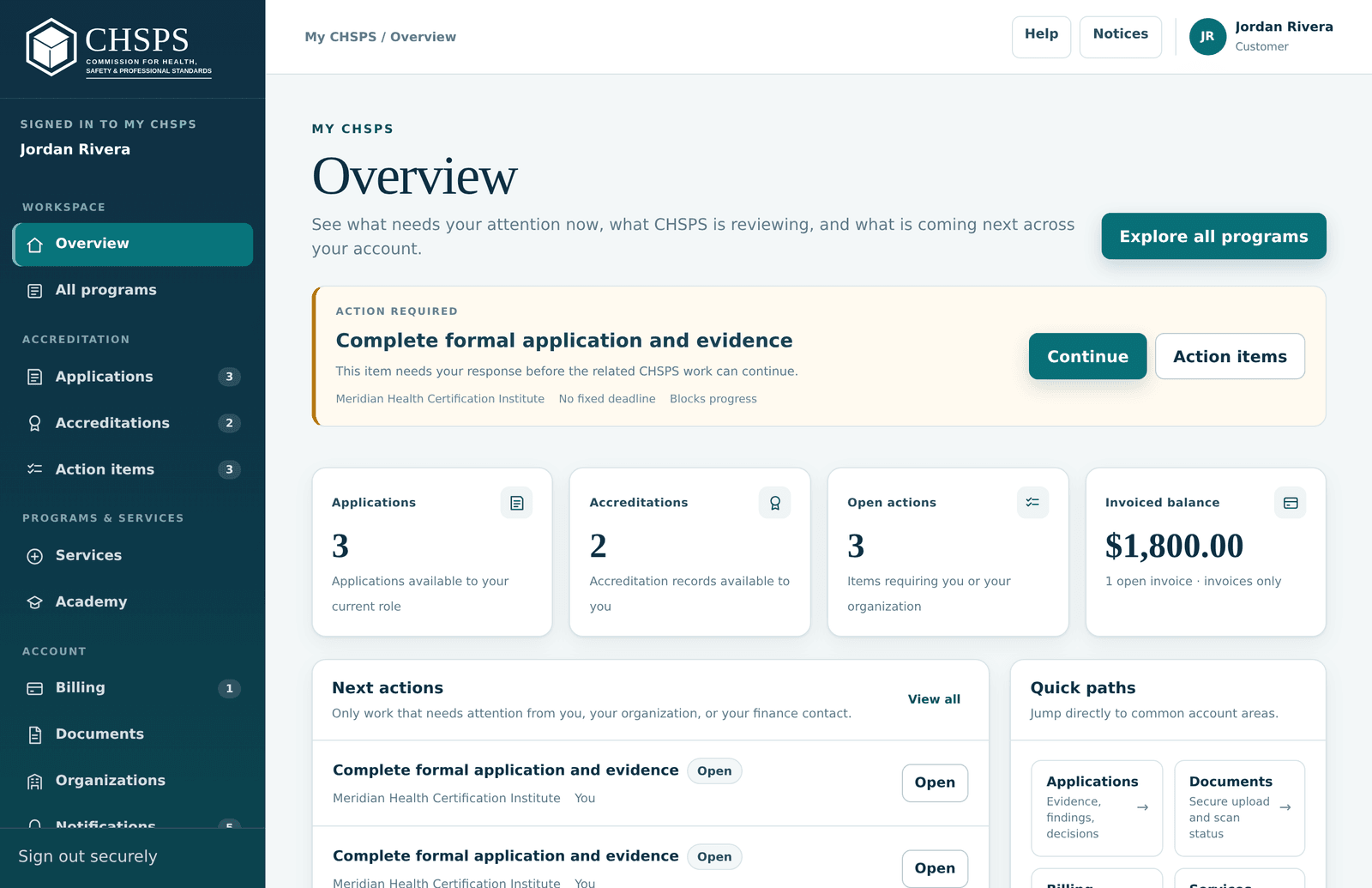
Find your way around the dashboard

The My CHSPS dashboard with sidebar navigation and the next-step focus card
Overview always surfaces your next step; the sidebar mirrors the sections in this guide.

After signing in you land on Overview — a focus card always shows your single next step, so when in doubt, start there. The left sidebar is organized in four groups. Workspace: Overview and All programs. Accreditation: Applications (everything in progress), Accreditations (your issued records) and Action items (every open task with its deadline). Programs & services: Services and the Academy education catalog. Account: Billing, Documents, Organizations, Notifications and your Profile. The top bar shows where you are, plus Help and Notices. On phones the same menu sits behind the ☰ button.

Profile, password and security

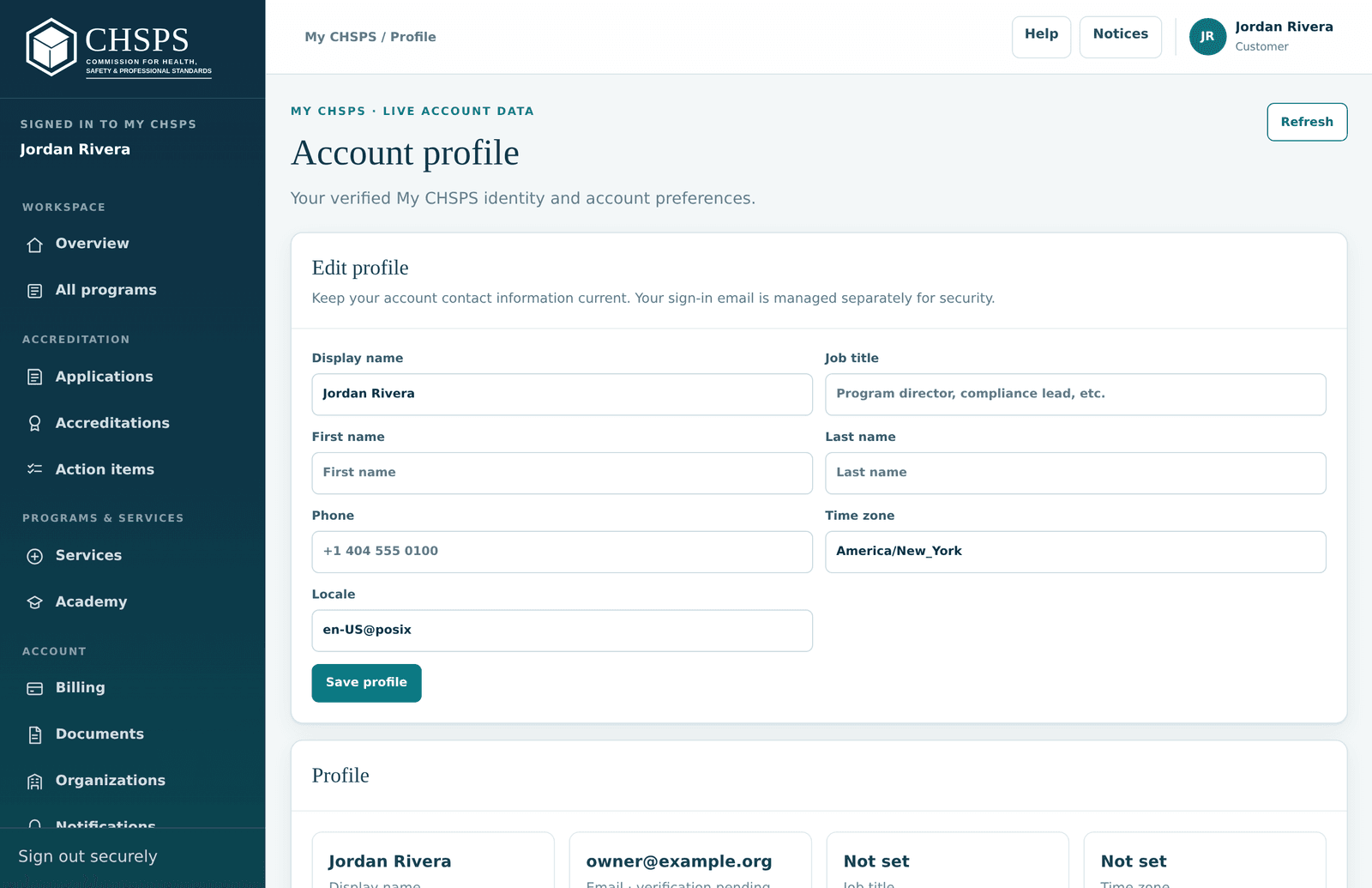
The account profile page in My CHSPS
Manage your sign-in details under Account → Profile.

Your Profile page (Account group in the sidebar) manages your name, sign-in email and password — passwords need at least 8 characters, and you can reset by email from the sign-in page if you're locked out. Organizations shows who else can act for your organization and their roles. Sign out with the button at the bottom of the sidebar when you're on a shared computer; sessions also expire on their own for safety, and anything you had typed into a report or application form is preserved as a draft.

Give teammates access to your organization

Accreditation is organization work, so the workspace is shared: applications, records, documents and billing belong to your organization, not to one person's login. See who has access under Organizations (Account group), and bring colleagues in by invitation so they join the same organization workspace with an appropriate role — finance can see and settle invoices, program staff can build evidence. Never share one login; individual accounts keep the history attributable and let people leave without disruption.

Notifications, deadlines and email notices

Everything that needs you lands in three synchronized places: Action items (every open task with its deadline), Notifications (the running feed, also behind the Notices button in the top bar), and email notices that mirror the important events — scope confirmations, review updates, maintenance and renewal milestones. If email seems missing, check spam and confirm the address on your Profile; the portal record is always the authoritative copy. Deadlines shown on records (maintenance due dates, renewal windows) are the ones that count.

Starting an application

From choosing a program to a confirmed scope — for every accreditation type.

Choose the right accreditation program

CHSPS operates sixteen programs, and your application starts by picking one. As a rule of thumb: a certification of persons (exam, credential, renewal cycle) fits Certification Program Accreditation (CERT); an organization delivering continuing education or training fits Education Provider Accreditation (EDP); a single defined course fits Course Accreditation (COURSE); assessment-based certificates and micro-credentials fit ABC Accreditation; structured apprenticeship-style programs fit Work-Based Learning (WBL). Six specialty accreditations recognize defined operational systems (assessment integrity, remote exam administration, medication safety, workforce competency, clinical education quality, AI governance), and two technology certifications cover AI proctoring platforms (APS) and AI learning/tutor platforms (ALTP). Endorsements and added scopes (AI-assisted assessment, AI learning & tutor provider supplement, telehealth workforce) attach to an existing record rather than standing alone. Not sure? The free eligibility inquiry confirms the right fit before any fee applies.

Program quick reference — terms and fees

Application fees are due at the signed engagement and, for the core pathways, credited toward the first review. Figures below are from the published Fee Schedule 2026.1.

  • CERT — Certification Program Accreditation (CHSPS-CERT-200) · 5-year term · apply $1,500 · annual $1,800 · renewal $4,500
  • EDP — Education Provider Accreditation (CHSPS-EDP-300) · 3-year term · apply $950 · annual $1,200 · renewal $2,600
  • COURSE — Course Accreditation (CHSPS-COURSE-400) · 3-year term · apply $400 · review $1,200 per course · annual $350 per course · renewal $800 per course
  • ABC — Assessment-Based Certificate & Micro-Credential (CHSPS-ABC-250) · 3-year term · apply $650 · annual $600 per program · renewal $1,500
  • WBL — Work-Based Learning & Competency (CHSPS-WBL-450) · 3-year term · apply $950 · annual $1,200 · renewal $3,000
  • Specialties — HSAI-210, REA-220, MSS-310, WCA-410, CEQ-510, AIG-610 · 3-year term · apply $1,250 · annual $1,500 · renewal $3,500
  • APS — AI Proctoring & Assessment Technology Certification (CHSPS-APS-710) · 2-year cycle · apply $2,500 + system evaluation $7,000 · annual surveillance $3,500 · recertification $6,500
  • ALTP — AI Learning & Tutor Platform Certification (CHSPS-ALT-720) · 2-year cycle · apply $1,800 + evaluation $5,200 · annual surveillance $2,500 · recertification $4,500
  • HSAI-AI — AI-Assisted Assessment Endorsement (CHSPS-HSAI-215) · follows its host record · concurrent $1,400 / added later $1,900 · annual $400 · renewal $900
  • ALT — AI Learning & Tutor Provider Supplement (CHSPS-ALT-320) · follows its host record · concurrent $900 / added later $1,400 · annual $300 · renewal $600
  • WCA-TEL — Telehealth Workforce Competency Scope (CHSPS-WCA-415) · follows its host record · concurrent $1,100 / added later $1,750 · annual $300 · renewal $700

Start with the free eligibility inquiry

Every application starts with a free eligibility inquiry — no payment details, no obligation. From your dashboard choose Applications → Start another accreditation (or "Browse accreditation programs"), pick your program, and answer the short intake about what you operate. The intake shows a live fee estimate for your pathway so there are no surprises later. CHSPS reviews the inquiry and confirms whether your program fits an open scope and which pathway applies. Fees begin only if a qualified application proceeds to a signed engagement.

Scope confirmation — your application opens

When CHSPS confirms eligibility, staff record your approved scope — a precise statement of what the review will cover (and what it won't). That confirmation opens the formal application: your application record moves to "Application Open", the stage rail shows Scope confirmed, and the evidence checklist for your pathway's standard is created. Two things then happen in order: you pay the application fee, and the evidence checklist unlocks. The scope statement follows you all the way to the certificate — it's exactly what appears on your public verification record if accredited.

Working in the Applications workspace

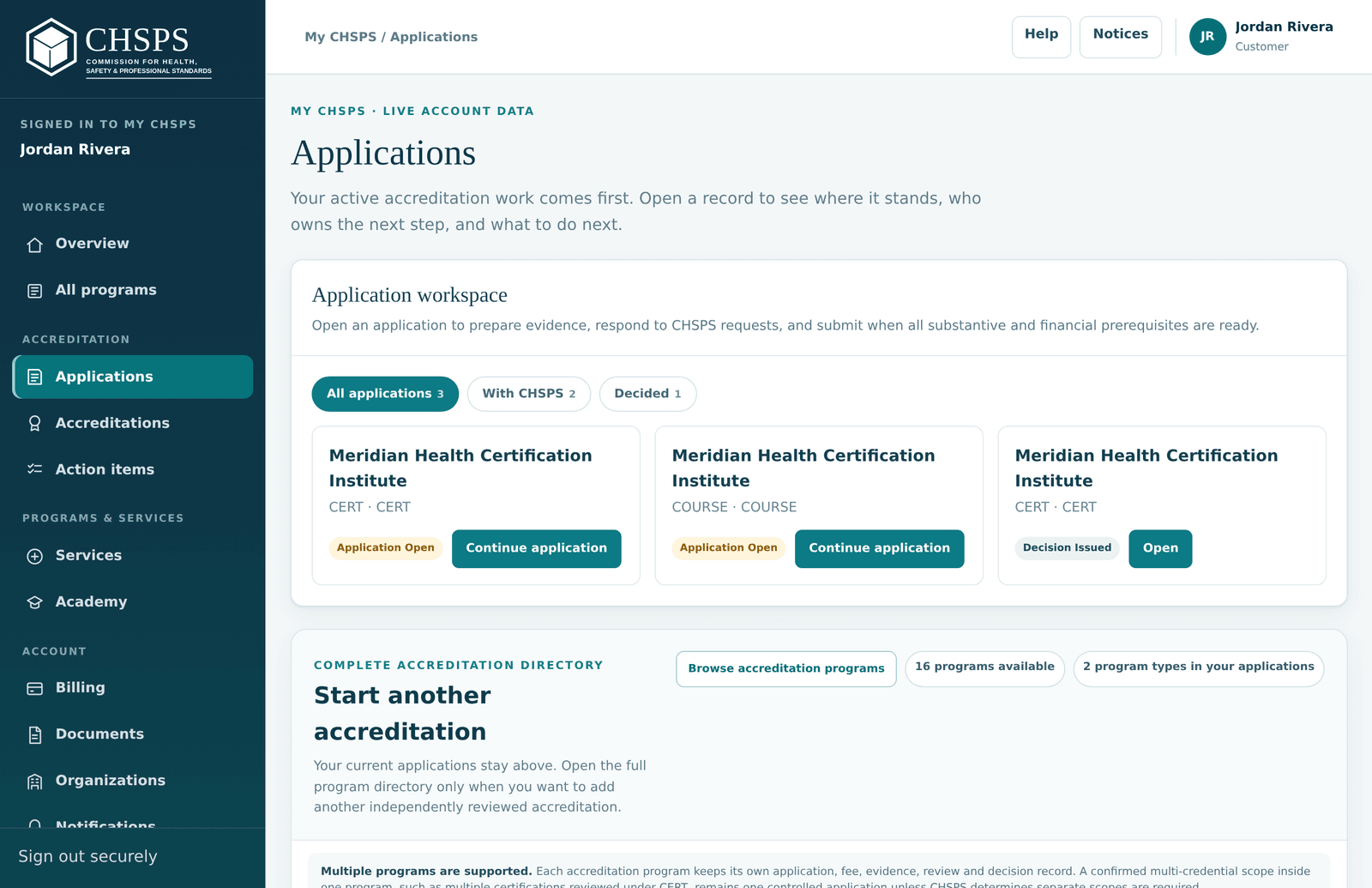
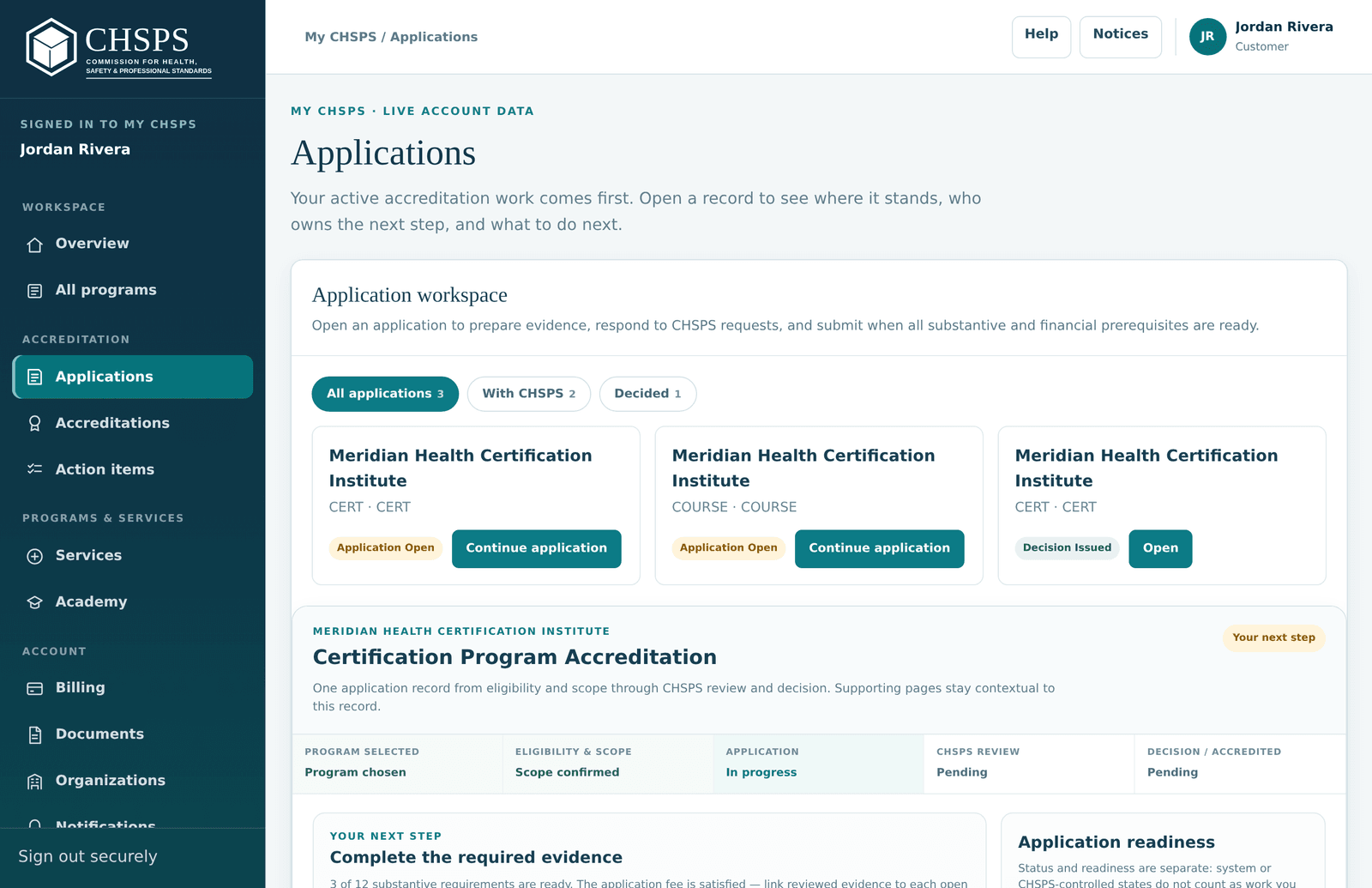
The Applications workspace with stage filter tabs and application cards
Every application is a card; the stage tabs show whose move it is.

Applications in the sidebar lists every application as a card — organization, program code, current stage, and one clear button. Stage filter tabs (All applications / With CHSPS / Decided) tell you at a glance whose move it is: With CHSPS means we're working, nothing is required from you. Open a card and the record shows a five-stage rail — Program selected → Eligibility & scope → Application → CHSPS review → Decision — plus a "Your next step" card that always names the single most useful action. Multiple programs are supported: each application keeps its own fee, evidence, review and decision record.

Pausing or withdrawing an application

Life happens — ownership changes, funding shifts, a program redesign mid-application. Don't just go quiet: the special situations guide has the routes for pausing an application, handling deadline conflicts, ownership changes, sensitive evidence and partial renewals, and using them keeps your record clean for a later return. Be aware before you start that fees already paid are non-refundable per the published Refund Policy — the eligibility inquiry is free precisely so you can confirm fit before any money moves.

Fees & billing

How payment works in the portal: invoices, receipts, and when each fee is due.

Pay the application fee

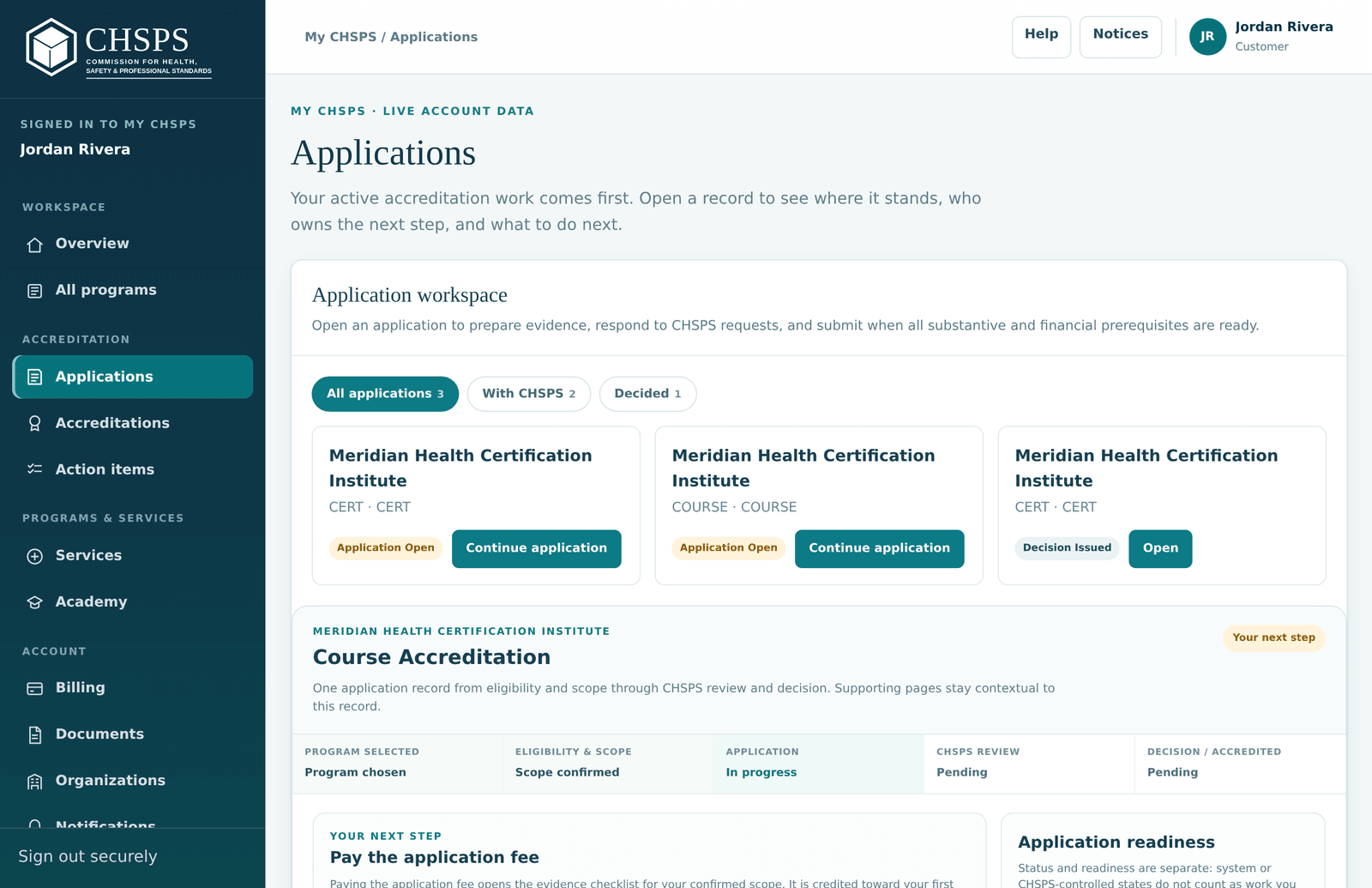
An application record showing the Pay the application fee next step
The record tells you exactly what the fee unlocks — and pays in place.

After scope confirmation your application's "Your next step" card reads Pay the application fee. Pay it right from the application record — secure card payment, no separate checkout to find. The fee is credited toward your first review on the core pathways, so it's never money lost on a successful engagement. Until it settles, the evidence checklist stays locked; the moment it settles, the checklist opens and the next-step card moves on to evidence. If your finance team pays separately, the open invoice also appears under Billing with a shareable secure payment link.

Invoices, receipts and order history

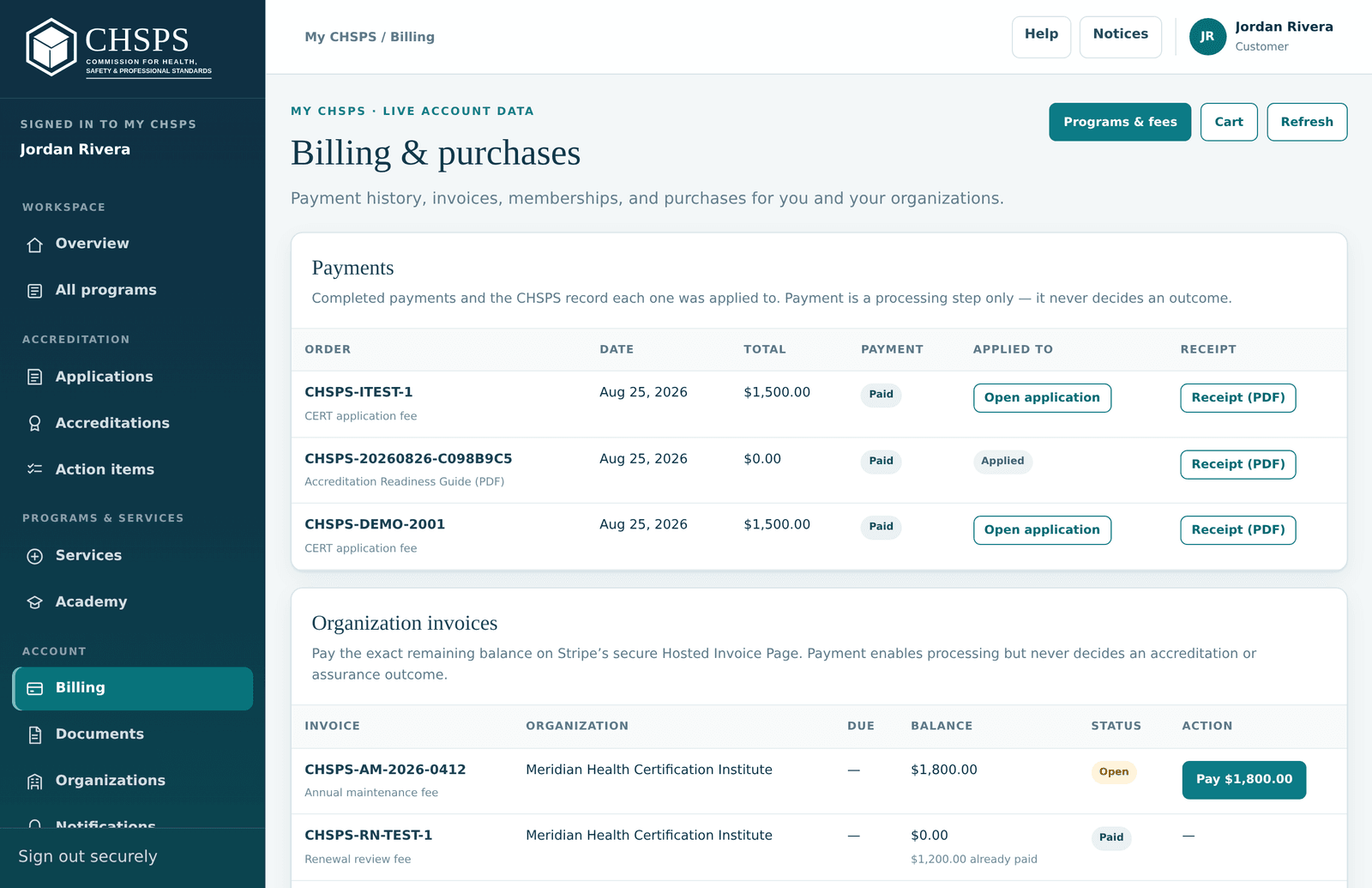
The Billing page listing invoices and PDF receipts
Every settled order has a PDF receipt; every open invoice has a secure payment link.

Billing (Account group) is the money page: open invoices with secure hosted payment links, everything you've paid, and a downloadable PDF receipt for every settled order — ready for your finance records. Invoices are issued automatically at each lifecycle stage (application fee, annual accreditation fee, renewal review fee, change reviews), each labeled with what it covers and the record it belongs to. Anyone in your organization workspace can see and settle them; you never need to forward card details.

When each fee is due

CHSPS collects each fee before the work it funds — never after, never as a surprise. The application fee is due at the signed engagement and unlocks the evidence checklist. The annual accreditation fee is invoiced with each maintenance cycle and must settle before that year's report can be submitted — the submit flow opens payment right there if it's still open. The renewal review fee must settle before a renewal submission is accepted, the same way. Change reviews and reinstatements are invoiced when you request them. Amounts come from the published, version-controlled Fee Schedule 2026.1 and later revisions never apply retroactively to an active engagement.

Payment never determines your outcome

No fee ever purchases an outcome. Reviewers and the decision committee never see billing, education purchases, membership or sponsorship records — payment status appears nowhere in a review file. Unpaid required fees simply pause processing (an application, maintenance report or renewal waits until the invoice settles); they are never punished with an adverse quality finding, and paying promptly never earns favorable treatment. You'll see this stated in the portal wherever money and process meet.

Are fees and purchases refundable?

No — every CHSPS fee and digital product is non-refundable once paid: application, review, annual, renewal, late, reinstatement and change fees, verification letters, and all education and digital purchases, regardless of review outcome, withdrawal or non-use. Fees fund independent review work committed when you pay, and no fee ever purchases an outcome. Billing errors are different and always corrected — a duplicate or wrong-amount charge is fixed on report. Contact billing before disputing a charge with your card issuer; receipts document exactly what was charged. Full text: Refund Policy.

How do we actually pay?

All payments run through secure hosted card payment (processed by Stripe) — from cart checkout, from in-portal purchase flows, and from the payment links on invoices in Billing. Invoice payment links are shareable, so your finance team can settle an invoice without a portal login, and every settled order produces a PDF receipt. CHSPS never asks for card details by email, and staff never need your card number. If your organization requires a different payment arrangement, contact CHSPS before the fee is due.

What you agree to when paying

Every payment surface shows a compact Terms & Refund Policy notice — the details are one click away — and payment proceeds only with your agreement to the Terms of Use and the Refund Policy (all fees and digital products are non-refundable). Your acceptance is recorded with the payment. Amounts always come from the published Fee Schedule, and fee revisions never apply retroactively to an active engagement, so what you agreed to is always reconstructable.

Evidence & submitting

Build your evidence domain by domain and submit when everything is ready.

The evidence checklist, domain by domain

An application record showing the per-domain evidence checklist
Each domain shows its requirement, guidance and linked evidence.

Once the application fee settles, your application shows the full evidence checklist for your pathway's standard — for example twelve domains for a certification program (governance, scope & eligibility, job analysis & exam blueprint, assessment security, scoring, candidate rights and so on) or ten for a course. Every domain has plain-language guidance describing what satisfies it — written for people doing this the first time. Work in any order, and use the progress chips to see what's complete, what's started and what's untouched. Your work saves as you go; nothing submits until you say so.

Upload documents

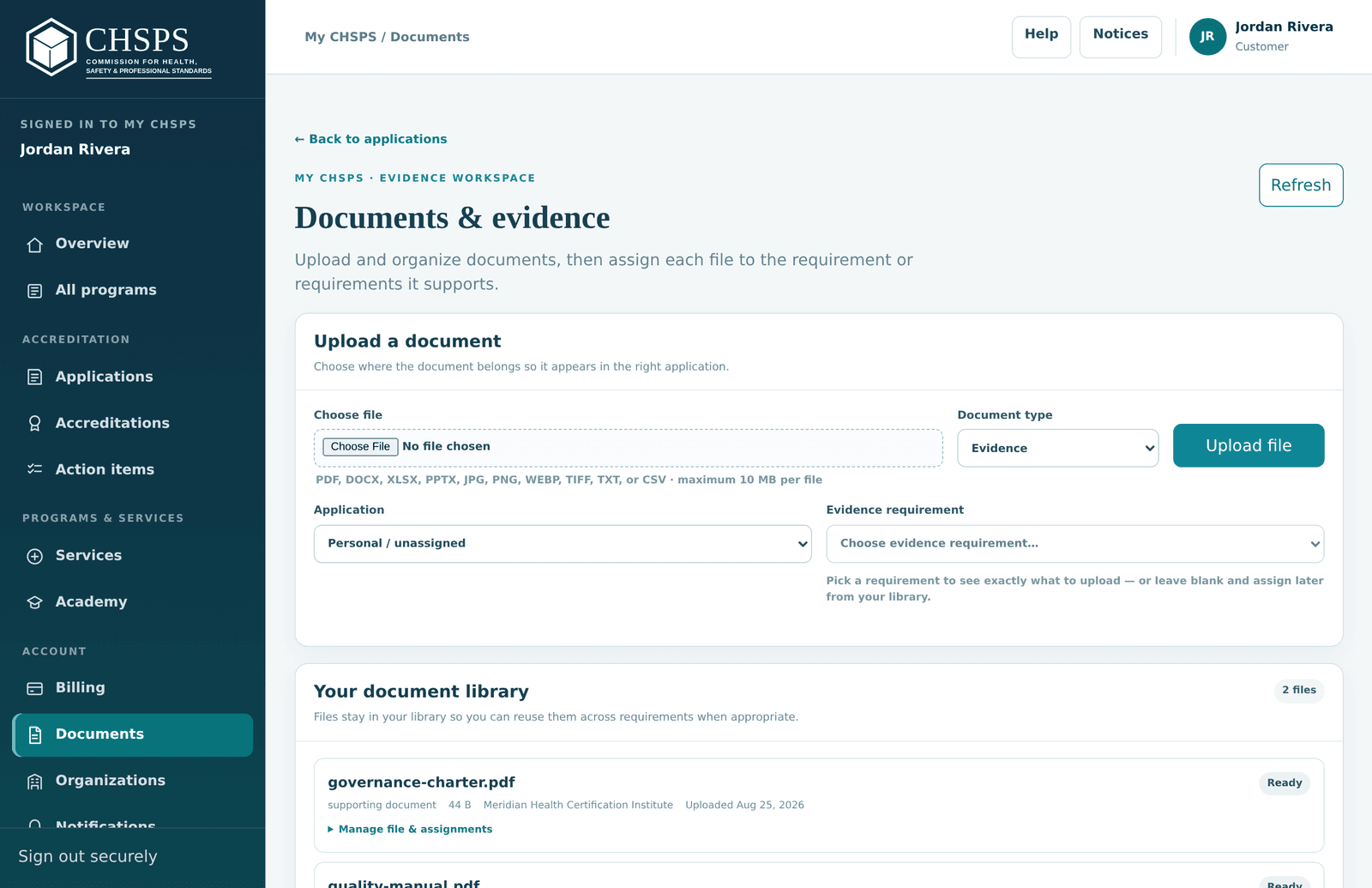
The Documents and evidence page with the upload form and library
Upload once, then link the same document wherever it serves as evidence.

Documents (Account group) is your evidence library. Upload from there or directly inside an application; either way, pick the application or record the file belongs to so it lands in the right context. Accepted types: PDF, Word (DOCX), Excel (XLSX), PowerPoint (PPTX), PNG, JPEG, WEBP, TIFF, plain text and CSV — up to 10 MB per file. Files are checked for type and size on upload and are available to link right away. Name files descriptively ("Exam-Security-Policy-2026.pdf" beats "final2.pdf") — reviewers see your filenames.

Attach documents to requirements

Evidence is a link between a document and a specific requirement — one document can serve several requirements without re-uploading (a quality manual often covers governance, records and improvement domains at once). Inside the application, open a domain and choose the document from your library to attach it. The domain's progress updates immediately. If a file isn't selectable yet, its upload did not finish — upload it again. You can swap or remove links any time before submission.

Submit for CHSPS review

When every domain has evidence and the readiness panel shows no blockers, the next-step card offers submission. Submitting hands the application to CHSPS — the workspace moves it under the With CHSPS tab, and the stage rail shows CHSPS review as pending. You can keep reading everything but the checklist locks against edits while we review. If anything is missing you'll get it back with specific requests rather than a rejection — see "Respond to findings" below. Published planning targets (not measured averages): roughly 4–9 months for certification programs, 3–6 months for education providers, 6–12 weeks for individual courses, driven mostly by evidence readiness and response time.

Who can see what you upload?

Evidence is business-sensitive and treated that way. Documents are visible only to your organization's workspace members and the CHSPS personnel working your engagement — reviewers are conflict-screened, and access is role-scoped. Uploads are checked for file type and size before they become linkable. Nothing you upload is published: public verification shows only the public record fields (holder, scope, number, dates, status), never your evidence. Sessions expire automatically, and you can see who has workspace access under Organizations. Details: Privacy.

Review & decision

What happens on CHSPS's side, and what to do when we ask for changes.

What CHSPS review looks like

During review your application sits under With CHSPS — no action needed from you unless we ask. A conflict-screened reviewer works through your evidence domain by domain; you may see clarification requests arrive as action items. The reviewer recommends; an independent decision committee decides — the reviewer alone can never grant or deny. Watch Action items and your Notifications: anything that needs you lands there with a deadline, and email notices mirror the important ones.

Respond to findings and change requests

If review finds gaps, you receive written findings tied to specific standards — never a vague "insufficient". The application returns to you with the affected domains reopened: fix the evidence (upload new documents, relink, annotate) and resubmit within the corrective-action window shown in the documented record. This is a normal part of most successful applications, not a failure signal. Findings, your responses and the resolution all stay in the documented record's history so there's never a question about what was asked and answered.

The decision — and appeals

The independent decision committee issues the decision in the documented record: the stage rail completes, and if accredited you'll find a new record under Accreditations with your number, certificate and promotion tools. A denial always comes with documented reasons, a right of appeal within 30 days to an independent panel not involved in the original review, and a path to reapply once gaps close. Decisions are never influenced by payment, education purchases or membership.

Your accreditation record

The record page, your certificate, the seal, and how to promote your accreditation.

Your accreditation record, tab by tab

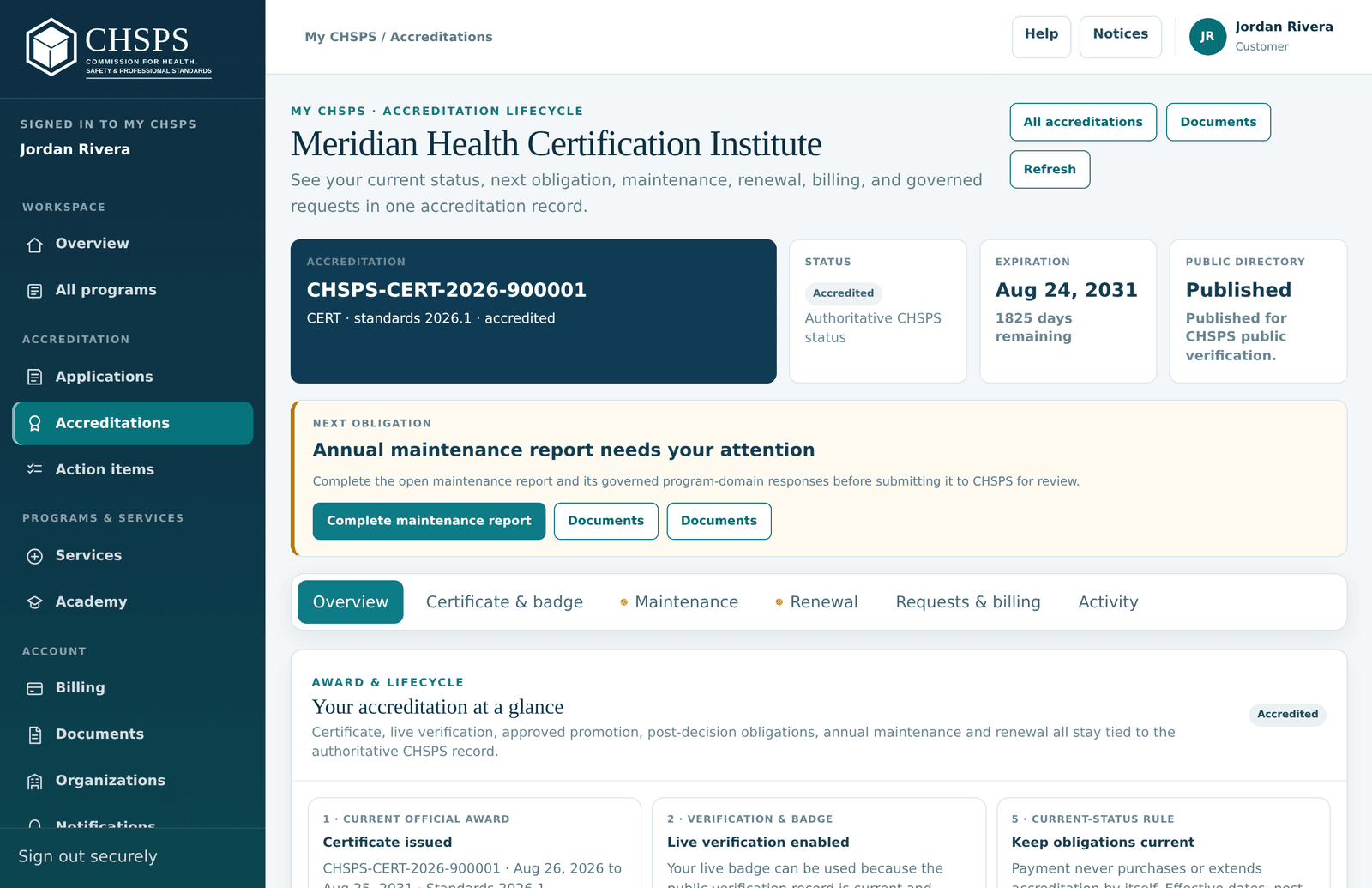
An accreditation record with its tab bar and identity card
The identity card stays put; tabs organize everything else.

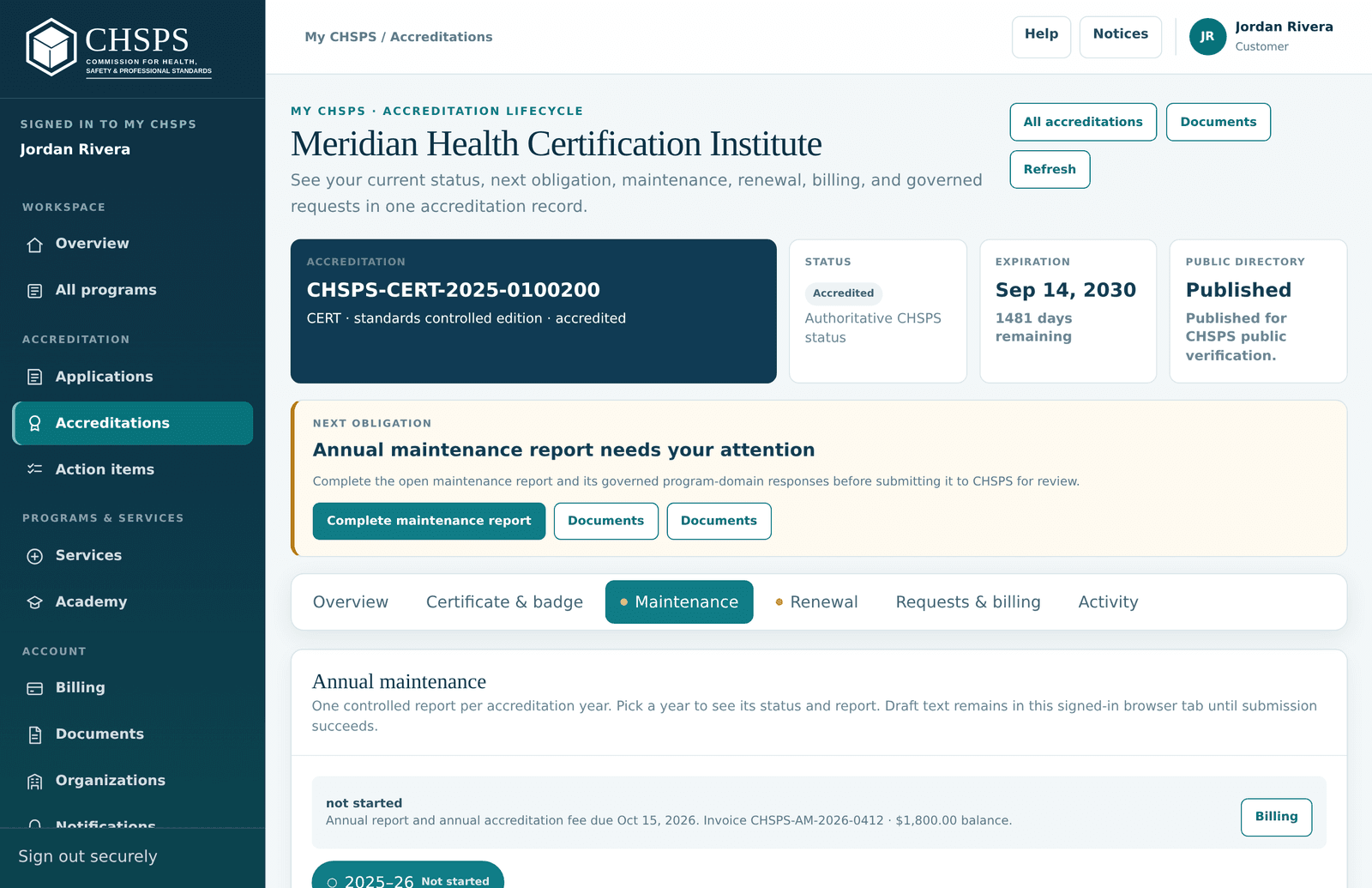
Open Accreditations and choose a record. The identity card on top — number, scope, dates, status — never moves, and a callout under it always names your next obligation. Everything else is organized in tabs: Overview (award steps and open action items), Certificate & badge (artifacts, seal, verification badge, sharing), Maintenance (the annual report), Renewal, Requests & billing (change reports and connected invoices) and Activity (full lifecycle history). An amber dot on a tab means something inside needs attention.

Certificate, QR code and official artifacts

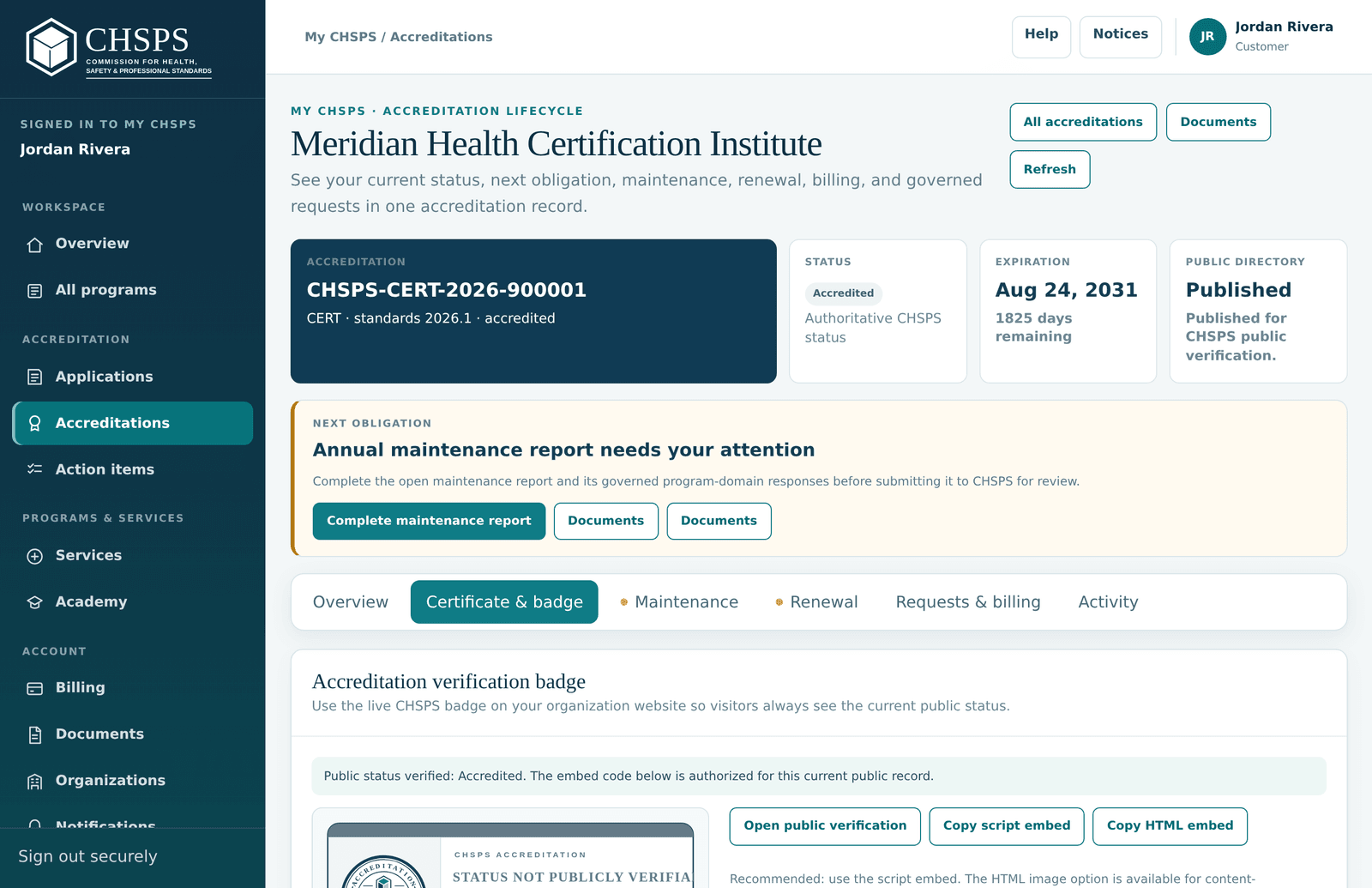
The Certificate and badge tab with artifacts and promotion tools
Artifacts, seal assets and sharing tools live together on one tab.

The Certificate & badge tab holds your official artifacts: the accreditation certificate (PDF) plus the formal statements CHSPS issues with it. The certificate carries your number, approved scope, dates — and a QR code that resolves to your live verification record, so printed and forwarded copies stay self-verifying: anyone who scans it sees current status, not the status the day you printed it. Download again any time; if your record is ever amended, artifacts are reissued automatically and the old ones are marked superseded.

Seal files and the live verification badge

The same tab provides the CHSPS seal files and an embeddable live verification badge for your website — a snippet that displays your accreditation with a link straight to your live record, so visitors can verify in one click. Use the seal only while your status is active, within your listed scope, with your accreditation number adjacent, per the Accreditation Mark & Claims Policy. If a record is suspended or expires, take current-status marks down; the historical record stays verifiable as history.

Add it to LinkedIn and share the news

The promotion block on Certificate & badge has one-click tools. For personal LinkedIn profiles, the Add to LinkedIn button pre-fills a Licenses & certifications entry — name, CHSPS as issuing organization, dates, your number as the credential ID and your verification link as the credential URL. LinkedIn company pages have no certifications section, so for the organization the right move is a post — the share buttons for LinkedIn, Facebook and X compose one with your number and verification link included. Every public claim should carry the number so anyone can verify it.

Organization name, contacts or details changed

Two different levers. Routine contact details (who receives notices, profile emails) are yours to update under Profile and Organizations. Changes that touch the accredited record itself — legal name, ownership, control, delivery sites, program structure — are material changes: report them from the record's Requests & billing tab so CHSPS can acknowledge or review them properly, and ownership changes have a guided route under special situations. When a record is amended, your certificate and artifacts are reissued automatically with the old ones marked superseded, so the paper always matches the record.

Annual maintenance

The report you file each year, and the annual fee that goes with it.

The annual maintenance cycle

The Maintenance tab showing the open reporting period and guided form
The Maintenance tab shows the period, the fee status and the guided report.

Every accredited record files a short report each year of its term — it's how accreditation stays meaningful between reviews. The Maintenance tab shows the current period, its due date, and a guided form: a summary of the year, quality improvements, material changes, complaints, leadership changes — then a status for every program domain. The banner above the form shows the period's annual fee invoice and its state. Start early: everything autosaves as a draft, so you can fill it over several sittings.

Answer every domain status

Per-domain status selectors on the annual maintenance report
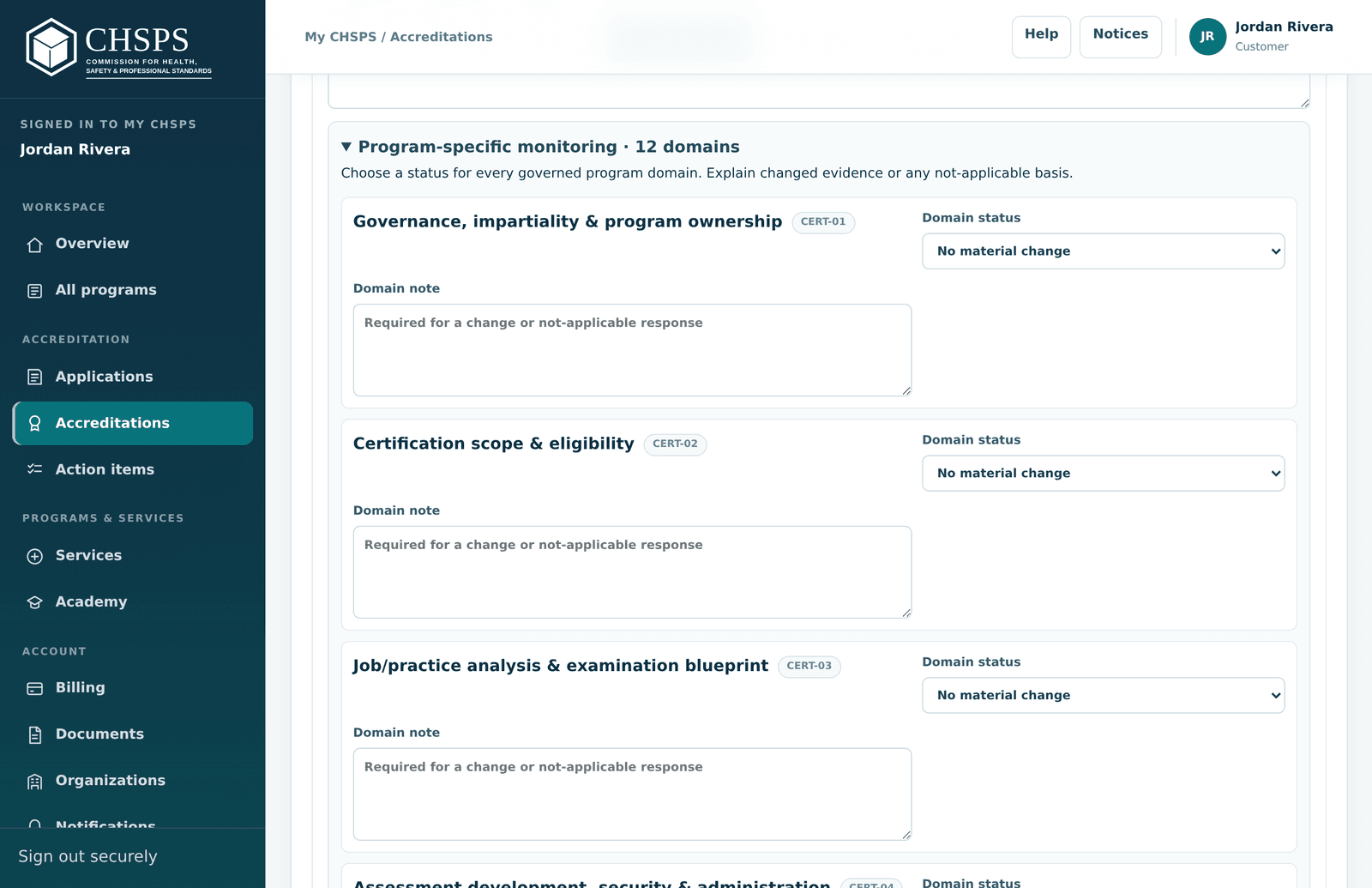
Every domain gets a status; changed domains carry their own documents.

The heart of the report: each domain of your standard gets a status. No material change needs nothing more. Choosing a changed status asks for a domain note and — for changed evidence — the supporting document attached inside that specific domain, so reviewers see exactly which change each file explains. Upload new files right from the report's document panel, then select them in the domain that changed. The form won't submit while a changed domain is missing its documents; it tells you which ones.

Settle the annual fee in the submit flow

The annual fee payment window that opens from the maintenance submit button
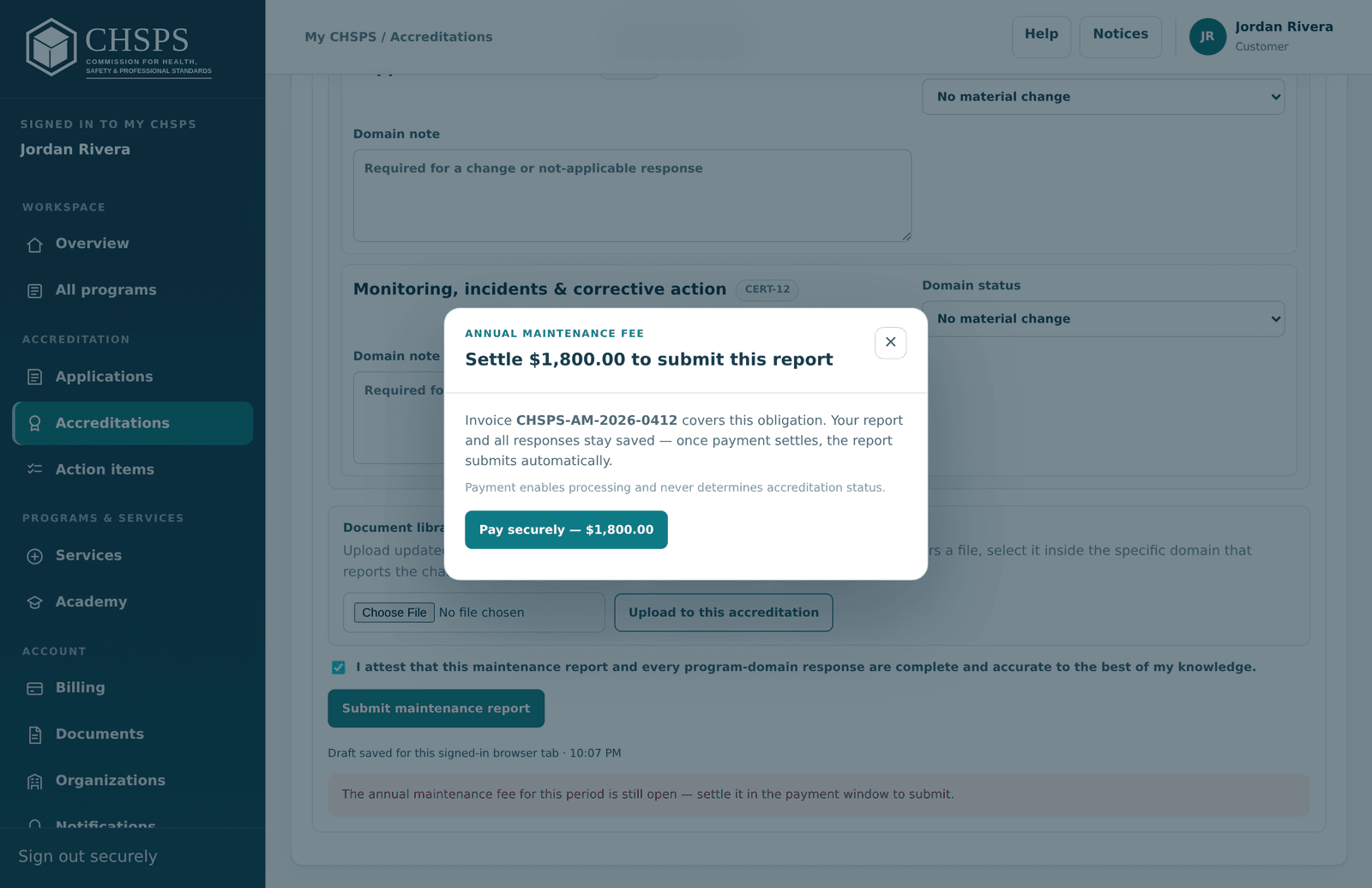
If the annual fee is open at submit time, payment opens in place — nothing is lost.

The annual accreditation fee is invoiced with the cycle and must settle before the report submits. You don't have to go hunting for it: if the invoice is still open when you press Submit maintenance report, a payment window opens right there — your answers stay saved, you pay securely, and the report submits automatically the moment payment settles. Prefer finance to handle it? The same invoice sits in Billing with a shareable payment link; once it's paid, come back and press submit.

Deadlines, the 30-day cure and the late fee

Each period's due date is shown on the Maintenance tab, in Action items and in email notices. Miss it and a 30-day cure period starts — file inside it and nothing happens. After the cure period a published $150 late filing fee applies (it does not compound), and continued noncompliance can lead to administrative suspension, which is visible in public verification. Reinstatement after an administrative suspension is $250 once the underlying issue is corrected. The fastest path is always simply filing inside the cure window.

Renewal & reinstatement

Renew before expiration — and what happens if a record lapses.

When and how to renew

The Renewal tab of an accreditation record
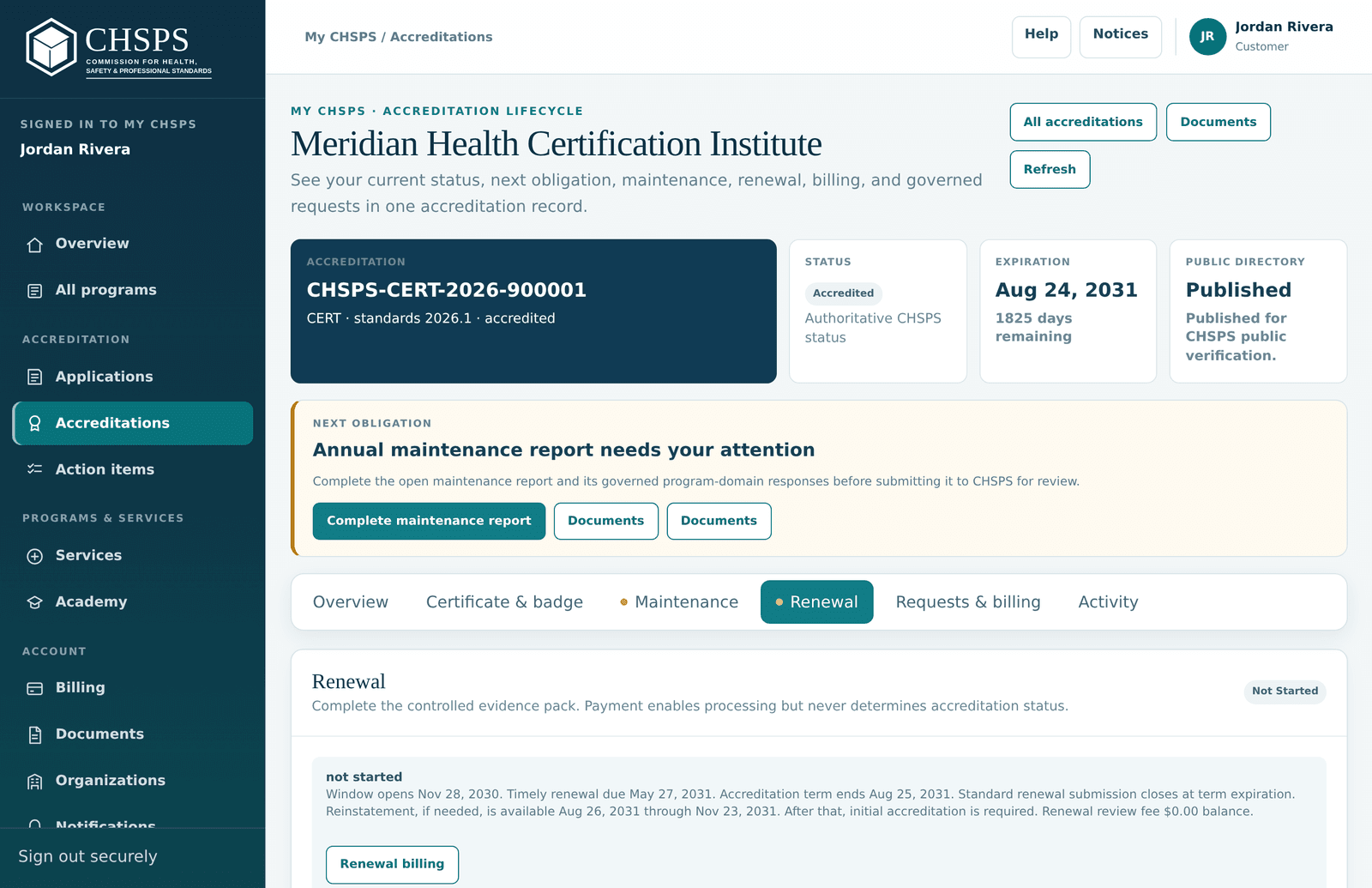
The Renewal tab shows your window, the form and the fee state.

Renewal keeps a record unbroken past its term (five years for certification programs; three for most other pathways; two for technology certifications). Your Renewal tab opens the window 270 days before expiration and shows the timeline; CHSPS recommends submitting about six months out. The renewal review fee settles in the submit flow, exactly like the annual fee. A complete renewal first submitted fewer than 90 days before expiration adds the late-renewal fee — 15% of the renewal review fee, minimum $150 — and accreditation ends at the expiration date with no automatic grace period, so early is the only safe schedule.

Complete the renewal submission

The renewal form mirrors maintenance but looks at the whole term: a continuity summary, material changes, open matters — then a status for every domain, with updated evidence attached inside any domain that changed. It autosaves as a draft. When you press Submit complete renewal for review, the renewal review fee settles first if it's still open (payment opens in place), then the case moves to CHSPS for re-review and a fresh decision. Renewal review fees by pathway are in the program quick reference.

Expiration and reinstatement

If no timely renewal is pending, accreditation ends at the close of the published expiration date: current mark use stops, and verification shows the historical record as Expired. Within 90 days after expiration CHSPS may accept a reinstatement request — $500 plus the applicable renewal review fee — requested straight from the record page; the record shows Expired until reinstatement completes. Past 90 days there's no reinstatement path and the normal initial application applies. Records suspended for administrative noncompliance instead use the $250 administrative reinstatement after the issue is corrected.

Education & orders

The Academy catalog, free resources, and access to what you've ordered.

The Academy catalog in your account

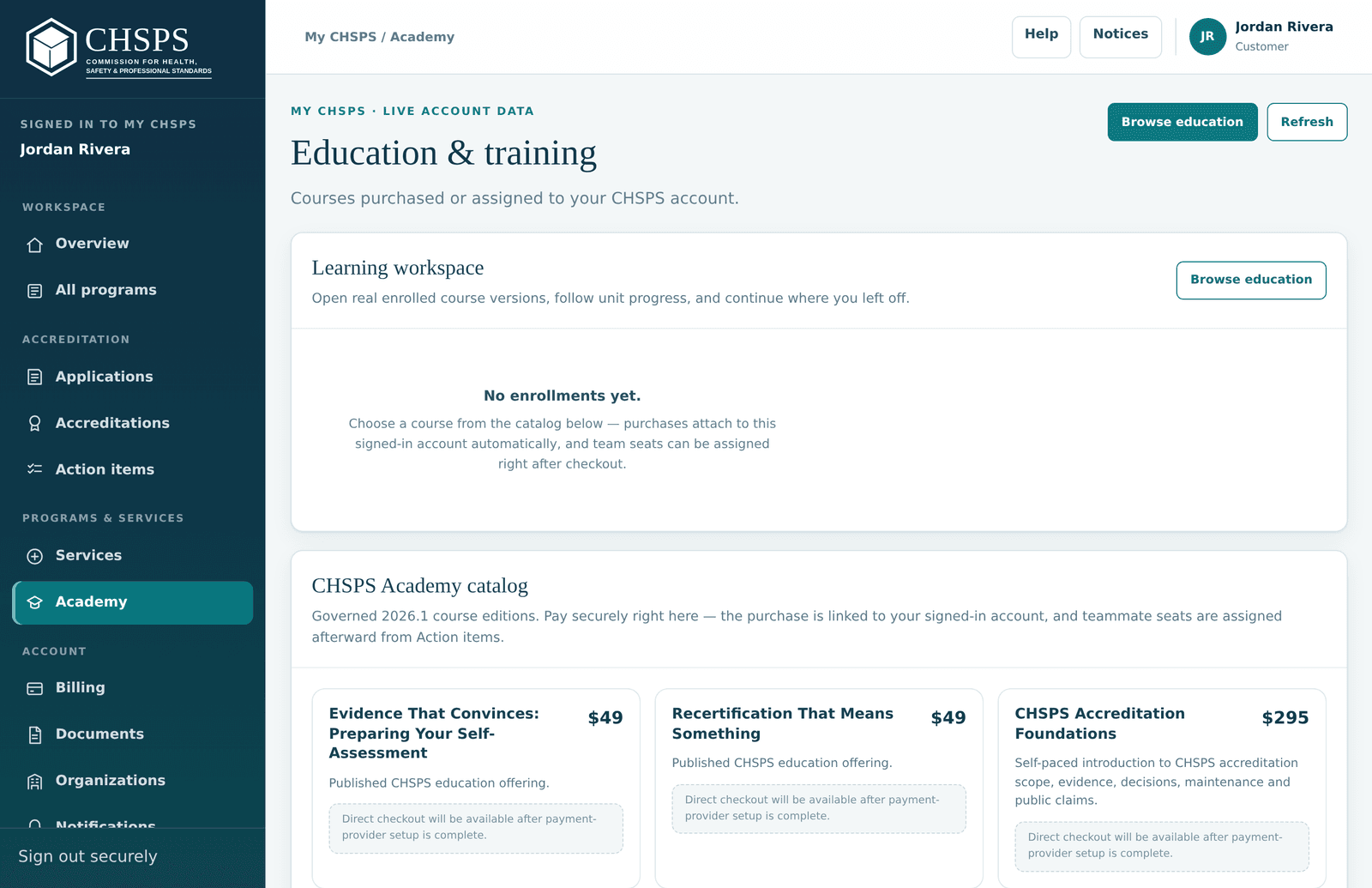
The Academy education catalog inside My CHSPS
Browse and order education without leaving your account.

Academy (Programs & services group) is the education catalog inside your account: orientation webinars, readiness workshops and courses, purchased without leaving the portal. Education is strictly separated from accreditation decisions — reviewers never see what you bought, and buying nothing costs you nothing in review. Live offerings show their published prices (the Course Readiness Workshop, for example, is $395 per person with a five-seat bundle at $1,495); free items are genuinely $0.

Free guide and webinar — how $0 orders work

The Accreditation Readiness Guide (PDF) and the Accreditation-Ready orientation webinar are free — but they're delivered through your account, so they arrive as $0 orders: add to cart, place the free order (no payment details are ever requested), and the resource attaches to your account for re-download any time. New here? Check out as a guest with just your email and claim your account right afterward — the order is waiting in it. This is also the fastest way to get an account before you apply.

Access what you've ordered

Everything you order — paid or free — lands in your account: your Academy page shows your learning, and Billing holds the order history with a PDF receipt per settled order. Course access details and any confirmations also arrive by email. If an offering includes a recording or materials, the offering page says so explicitly — that's the promise we keep, so if it doesn't say it, don't assume it.

Troubleshooting & support

Quick fixes for common snags, and how to reach a person.

Verify any CHSPS accreditation

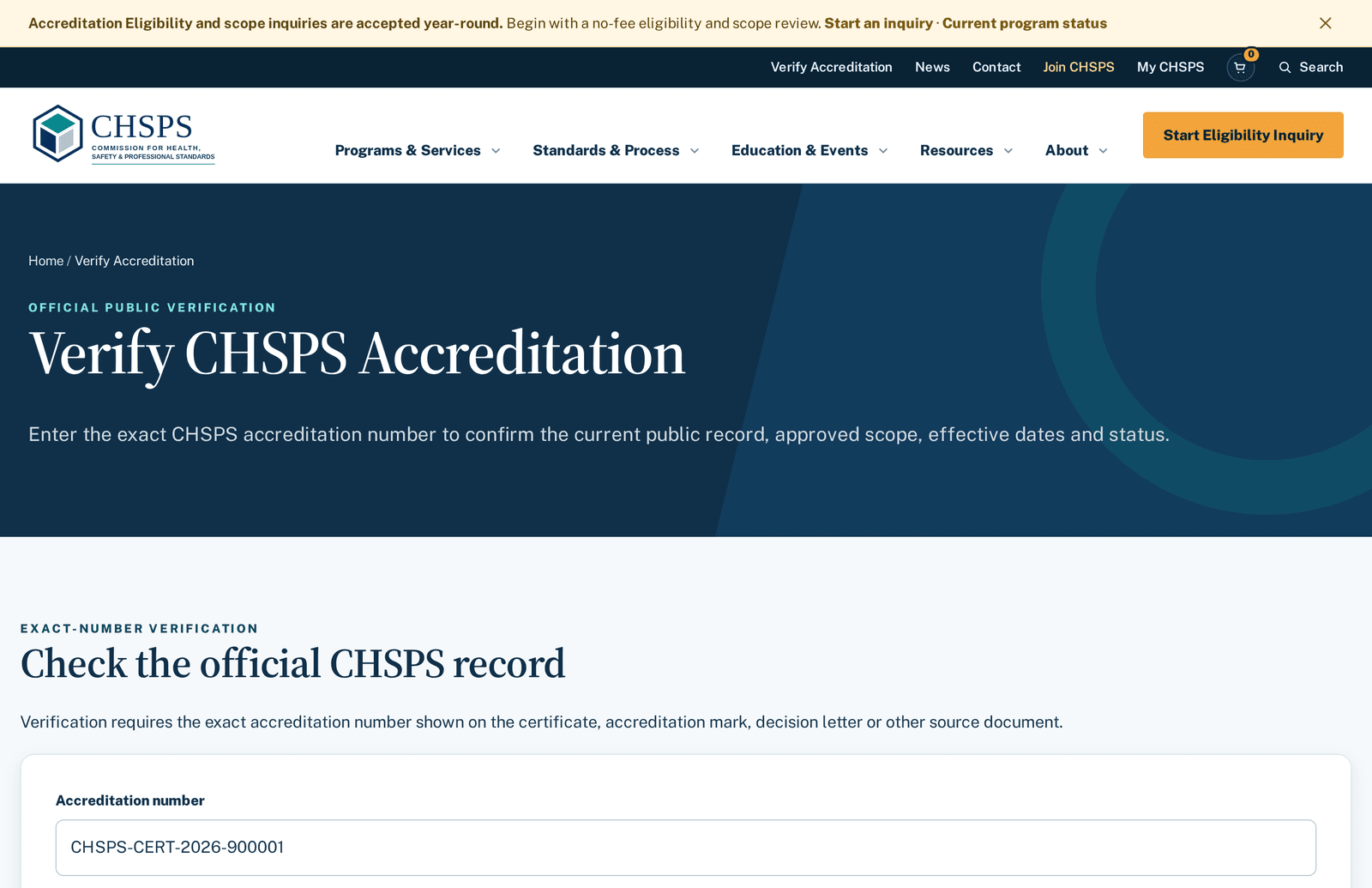
The public verification page showing a matched record
Exact-number verification returns holder, scope, dates and status.

Anyone can verify a CHSPS accreditation — no account needed. Enter the exact accreditation number at chsps.org/verify (or scan the QR on a certificate): a current record returns the holder, approved scope, dates and status. There's deliberately no browseable roster — a legitimate claim always carries its number, and the number always answers. A formal signed verification letter is available for $100 USD from the same page when a regulator or procurement file needs paper.

Common issues and quick fixes

Submit is blocked? Nine times out of ten a required fee is open — the dialog that appears lets you pay in place, and your answers stay saved. Upload rejected? Check type and size: PDF, DOCX, XLSX, PPTX, PNG, JPEG, WEBP, TIFF, TXT or CSV, max 10 MB per file. Document not selectable as evidence? Its upload did not finish — upload it again. Report won't submit with a changed domain? Attach the supporting document inside that specific domain. Typed something and left? Reports and forms autosave drafts to your account. Cart looks empty at checkout? Sign in first, then re-add; your saved items reconnect. Still stuck — use the Help button or contact us with the record ID.

Contact CHSPS and special situations

For questions about an active engagement, contact CHSPS and include the application or accreditation ID from the record page — it routes your message with full context. For things that don't fit the normal process — ownership changes, application pauses, deadline conflicts, sensitive evidence, payment issues, partial renewals — start from the guided routes on special situations rather than improvising. Complaints and appeals have their own documented, independent track on Complaints & Appeals.

About the Ask CHSPS Help assistant

The Help button in your portal opens this guide plus an assistant that answers questions in plain language. It answers only from CHSPS's published help content and links the exact topic it used, so you can read the source yourself. It can't see your specific records, doesn't give legal or financial advice, and its answers aren't official CHSPS determinations — for anything binding about your engagement, use the record page or contact CHSPS. If it doesn't know, it says so and points you to a person.

Screenshots show a demonstration organization. Guide version 2026.1-v367 · updated 2026-08-25. Machine-readable copy: portal-guide.json.

Ready when you are

Open My CHSPS and take the first step.

The eligibility inquiry is free, and everything in this guide is waiting inside your account.

Ready when you are

Start with a free eligibility review.

Tell us what you certify or teach. We’ll confirm fit and scope in writing — no fee, no obligation.